
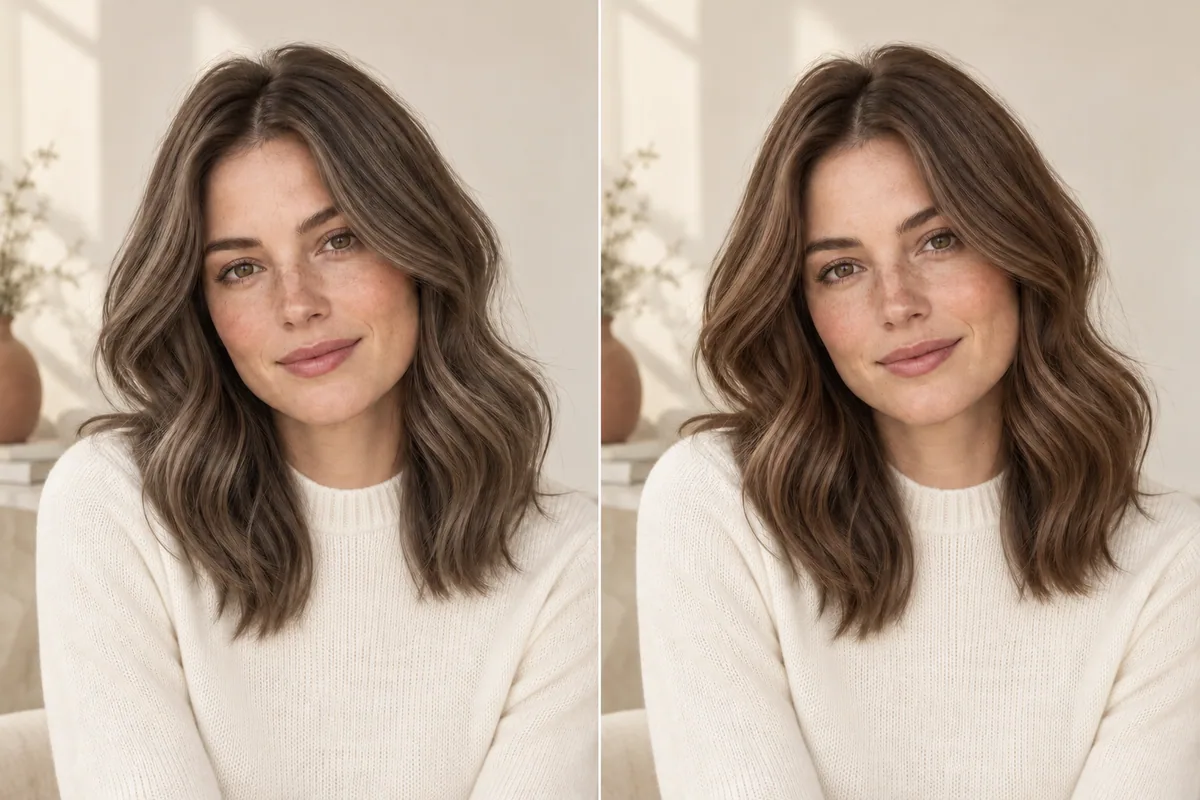
Ash brown describes a cooler, often smoky brunette direction. Neutral brown is a useful description for a brown that does not look strongly cool or strongly warm in your chosen reference. In an ash brown vs. neutral brown comparison, hold the apparent darkness steady first. Otherwise, you may pick the lighter picture while thinking you have chosen its tone.
You do not need to decide that one family is better. The practical question is how much coolness you enjoy in your brown—and whether the words on the photo describe the same thing you are seeing.
What do ash and neutral tell you?
Wella Professionals describes ash brown as a cool brunette with smoky, muted tones. That can be a subtle impression or a more noticeable silvery cast. “Ash” on its own does not tell you how dark the hair is or how much variation runs through it.
Neutral is also used as a shade-family label. For example, the Wella colorcharm shade guide lists neutral browns at several depths. The useful lesson for a consultation is that a tone name and a depth description are separate pieces of information.
Do not transfer a brand's shade name or number to another product as though it were a universal code. Show the actual reference or swatch you mean. If you say “natural brown,” explain whether you mean your own uncolored hair, a natural-looking result or a particular shade with that name.
Our ash brown vs. chocolate brown article addresses a different comparison: chocolate is a broad descriptive label and can include both warmer and cooler interpretations. Here, keep the question narrower: do you prefer a visibly cool brown or a less strongly toned brunette appearance?
Build a fair pair before choosing a favorite
Find two photographs with roughly similar overall darkness. They do not have to match perfectly, but a pale smoky brunette beside an almost-black brown will make the tone comparison difficult.
Check the largest area of hair, not just the lightest strand. One image may contain bright highlights while the base is just as deep as the other. A glossy reflection can also look much lighter than the surrounding hair. Look at more than one part before deciding which photo is darker.
Then compare these features:
On a small screen, swipe the table to compare every column.
| Keep similar | What it helps you judge | What to avoid mixing into the decision |
|---|---|---|
| Overall depth | The difference in coolness | A large light-to-dark change |
| Lighting | How the tone appears under comparable conditions | Blue window light in one image and a warm lamp in the other |
| Hair finish | The color rather than the styling | Choosing the smoother or glossier photo automatically |
| Amount of dimension | The base color you prefer | Mistaking bright highlights for a different all-over shade |
The generated illustration above holds the subject and broad styling similar to make this comparison easier to discuss. Its colors are editorial interpretations, not calibrated salon swatches. You should not use it to select a dye code or expect an exact match on your hair.
How cool do you want the brown to look?
Instead of asking only “ash or neutral?”, look for the point where the coolness becomes more noticeable than you want. A subtle muted brown and a clearly smoky one may both appear in ash-brown searches, but they create different requests.
Try saving three references: one you like, one that feels too warm and one that feels too cool. Label the specific feature in each. “Too gray through the ends” and “too red in the overall brown” are useful boundaries. “Wrong color” gives your colorist much less to work with.
Look at the hair beside your face as well as the lengths. You may like a cool impression through the ends but prefer something quieter around your forehead. Or you may enjoy the more obvious coolness everywhere. Your preference does not need to follow a rule about which skin tones are allowed to wear ash brown.
If the reference you like is labeled chocolate ash, keep it. The chocolate ash brown guide explains how to read that combined description. A different caption does not invalidate a useful visual example.
Check three ordinary lighting situations
One attractive image is a starting point, not the complete description of a color. When possible, find another view of the same hair. You are looking for an appearance you can recognize across ordinary settings.
Near a window: Look for reasonably even light and a clear view of the hair. Notice whether the brown still appeals when the smaller tonal differences are visible. This is useful context, but daylight photographs are not automatically color-accurate.
In normal indoor light: Consider the kind of setting where you spend much of your day. You may be comfortable with a brown that reads warmer here, or you may want to ask your colorist about that expectation before deciding.
In shade or a dimmer room: Check whether the reference still gives the overall depth you enjoy when its lighter reflections are less visible. If it simply looks too dark, return to the depth decision.
Camera white balance can change the colors across a whole photograph, as Adobe's white balance guide explains. Look at the wall, clothing and skin as clues to a strong color cast. You cannot recover an exact salon color by inspecting a phone image, but you can recognize when a comparison is especially uncertain.
Make a note about your current brown
Before collecting more inspiration, describe what you would keep about your own color. Perhaps the depth is right but the ends look warmer than you prefer. Perhaps you like the tone but want more visible variation. Those are different requests from a complete move to a darker ash brown.
Use a current photo without a strong filter. The photo checklist will help you get a clear starting image. If different parts of your hair look different, mention where rather than treating the whole head as one uniform starting shade.
Tell your colorist about previous coloring you remember and ask how it affects the options. A cool-looking target does not establish what process would be needed. If you are still deciding among several color families, use the broader hair color choice guide before narrowing the exact brunette tone.
Use a preview to test the broad brunette direction
In Hair Magic on iPhone, take or select your current photo, keep your current hairstyle and browse the available brunette colors. Choose the closest direction to the reference you want to explore. Salon labels such as ash and neutral do not necessarily correspond to separate app options.
Review your choice, then tap Generate. The photo uploads for cloud AI processing, which requires an internet connection. Compare the result with your original and record whether its depth and tone move toward your preference. The hair color changer guide explains the process.
Keep the same photo if you explore another color. If the generated hair also becomes much shinier, fuller or differently styled, separate that change from your reaction to the brown. The preview cannot measure your existing pigment, choose a formula or guarantee a salon outcome.
Hair Magic is free to download with in-app purchases; current generation access is shown in the app. Optionally save a useful result, then add it to your real inspiration photos. A Salon Card can keep the chosen direction and practical notes together.
A brunette request with less room for misunderstanding
Here is an example to adapt: “I want to keep roughly this depth. I like the muted brown in the first photo, but the second looks too gray for me. I would prefer a quieter brunette impression around the face. Please explain what is realistic from my current color and what I might notice between appointments.”
That brief leaves your colorist room to assess the hair and discuss a suitable service. It also makes your preference clear enough to revisit. You are choosing an amount of coolness at a particular depth, rather than relying on two short labels to communicate the whole result.
About this guidance. Published by Hair Magic, the app discussed here. Product details are based on the Hair Magic App Store listing, checked on 18 October 2026. This is planning guidance, not a professional assessment of your hair. AI previews are visual estimates; features and prices may change.
Read our editorial approach or explore all journal articles.