
A hair color changer lets you preview a different shade on a photo of yourself before deciding whether to pursue it. Use the preview to compare the overall color impression: lighter or darker, warmer or cooler, uniform or dimensional. It cannot tell you exactly which salon process your hair needs or guarantee how a dye will develop.
Hair Magic offers 21 color options, including solid shades and dimensional directions such as balayage, highlights, ombré, root shadow, gray blending, and lowlights. You can retain your current hairstyle for a color-only preview, which helps separate the color decision from the haircut decision.
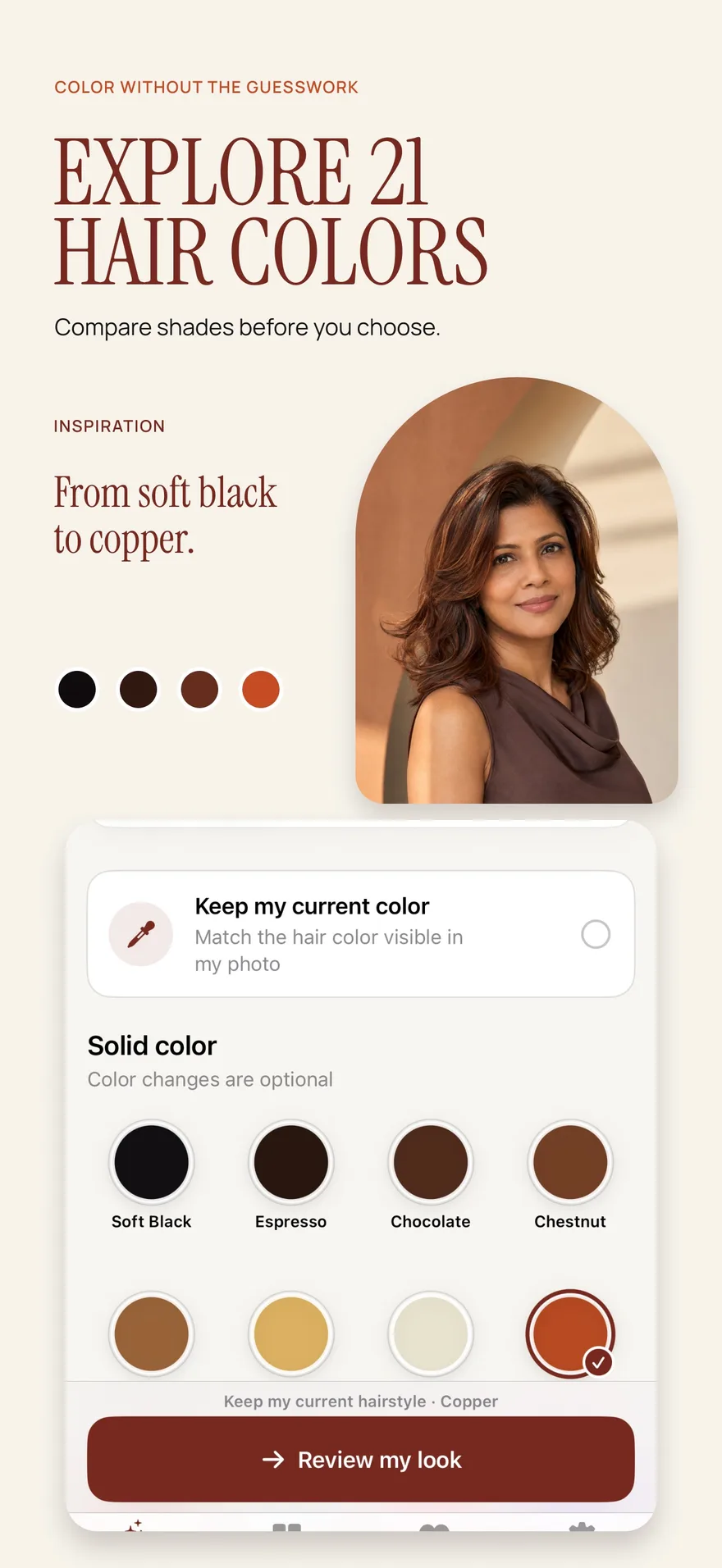
Source: App Store screenshot, captured 8 September 2026. Portraits are style inspiration.
Start with a color question you can compare
Pick a contrast that matters to you. Perhaps you want to know whether you prefer a warmer impression, whether darker hair feels more like you, or whether variation through the lengths is more appealing than a single shade. Narrowing the question makes the result easier to judge.
For a first comparison, keep your haircut and texture familiar. A new shade paired with new bangs and much longer hair may look exciting, but you will not know which element is driving your reaction. If you later want to change both cut and color, record your preferred color direction first.
The hair color decision guide offers a way to compare contrast, personal warmth preferences, and upkeep without assuming there is only one correct shade for your appearance.
Use a photo with believable lighting
Choose a clear, recent image taken in even light. A strongly yellow room, a colored light, or intense direct sun can change the apparent relationship between your complexion and hair. A filtered photo may also hide the tones you are trying to evaluate.
Make sure enough of your current hair is visible to assess where the color sits. If most of your hair is behind your shoulders, you may not get a useful view of the lengths. Keep your original available, because the color preview needs a baseline.
Screen brightness and display settings affect how a shade appears. Judge broad direction before subtle differences. A phone image is not a salon color swatch, and a result that looks copper on one screen may appear more muted on another.
Create a color-only preview in Hair Magic
To preview a different hair color in Hair Magic, keep your current hairstyle and follow these steps. The workflow and available features are described in the Hair Magic App Store listing.
- Take a photo or choose one from Photos with your hair clearly visible.
- Keep your current hairstyle when your goal is to examine color alone.
- Explore the available color choices and select a direction that answers your question, such as a solid shade or a dimensional option.
- Review the selections before tapping Generate. Your photo is uploaded for cloud processing, so an internet connection is required.
- Compare the completed result with the original. Look at the hair as a whole before focusing on small tonal details.
- Optionally save the result, export it to Photos, or share it. Create a Salon Card with the chosen color and notes about the effect you like.
Hair Magic is free to download with in-app purchases. Premium includes unlimited previews while the subscription is active. The listing does not establish how many, if any, AI generations are included without a subscription.
Compare overall effect and placement separately
For a solid shade, ask whether you enjoy the overall depth and contrast around your face. Does the change feel subtle, bold, familiar, or intentionally different? Try describing your reaction without calling a color universally flattering or unflattering. Personal preference is the point of the exercise.
For dimensional color, also examine placement. Do you prefer a brighter impression near the face, variation throughout the lengths, or more contrast between roots and ends? Those observations become useful consultation notes even when the exact placement in an AI image cannot be reproduced.
If the placement itself is your main question, the balayage try-on guide explains how to examine transitions. If you are exploring visible gray, start with gray hair try-on to distinguish a gray appearance from a plan for managing existing gray.
Add the information a picture cannot show
A color preview does not know the full history of what has been applied to your hair. It cannot measure condition, predict lightening, or establish whether a color can be achieved in one appointment. Your starting shade, existing color, texture, and previous processing all belong in the salon conversation.
Write down your practical preferences before choosing a favorite. How noticeable are you comfortable with regrowth being? How often do you want to return to the salon? Are you interested in an overall change or mainly variation near the face? What ongoing care are you willing to discuss and maintain?
Ask a qualified colorist to explain the process and realistic result for your own hair. Do not use a simulated image as a formula for at-home mixing or chemical processing.
Use this shortlist before booking
For each color direction, complete these statements:
- The effect I like most is the depth, warmth, contrast, or placement of color.
- The part I would change is the brightness, overall intensity, or amount of variation.
- My starting hair includes these previous color or processing decisions.
- My routine and appointment preferences are these.
- I need a colorist to explain feasibility, maintenance, and the likely difference from this image.
Two well-described options are often easier to discuss than a folder of unrelated inspiration. Keep the original photo alongside your preview so the starting point stays clear.
The Salon Card guide shows how to assemble that information. Use Hair Magic to find a color direction you want to discuss, then let a professional assess how your actual hair can move toward it.
About this guidance. Published by Hair Magic, the app discussed here. Product details are based on the Hair Magic App Store listing, checked on 18 October 2026. This is planning guidance, not a professional assessment of your hair. AI previews are visual estimates; features and prices may change.
Read our editorial approach or explore all hairstyle guides.