
Trying on hairstyles with a photo lets you explore a haircut before changing your actual hair. Start with a clear picture, choose one style direction, and compare the preview with your original. The most useful result is a clearer preference: the length you enjoy, where you want volume, or whether you prefer your forehead open or framed.
Hair Magic is an iPhone app that creates cloud-processed AI hairstyle previews from your photo. Its catalog includes 94 hairstyles and 21 color options. A preview is a visual estimate, so use it to prepare questions and references for a hairstylist rather than as a promise of an exact finished cut.
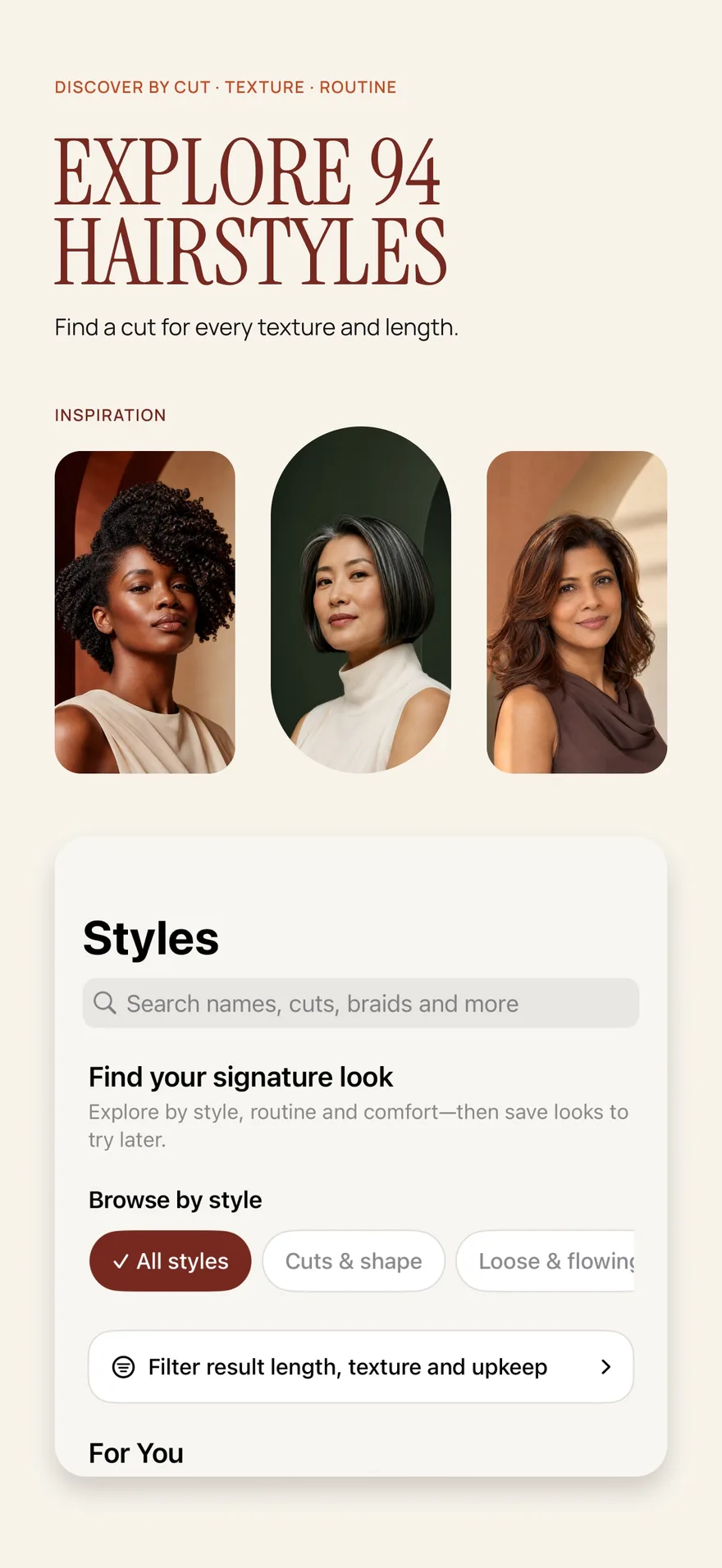
Source: App Store screenshot, captured 8 September 2026. Portraits are style inspiration.
Still choosing a tool? Compare four iPhone hairstyle apps or read the browser-versus-app guide before beginning. If you prefer describing the idea in words, our ChatGPT and hairstyle-app comparison explains the different input workflows.
Decide what you want to learn first
A try-on is easier to interpret when it answers a specific question. “Would I enjoy hair above my shoulders?” produces a more useful comparison than “Give me a completely new look.” Write down one change you are considering and one thing you want to retain.
For example, you might want a shorter outline while keeping a familiar color, or you might want to explore bangs while retaining most of your length. If you change length, texture, fringe, and color together, it becomes harder to identify which change you like. You can still explore a dramatic makeover later, once you understand its parts.
If you do not yet have a direction, the guide to choosing a hairstyle helps turn broad inspiration into a small set of questions.
Choose a useful starting photo
Use an up-to-date picture with your face and current hair clearly visible. Even lighting, a simple background, and a comfortable forward-facing position make it easier to judge the resulting outline. Avoid a picture whose main appeal comes from a heavy beauty filter, dramatic shadow, or a camera angle you rarely see in everyday life.
Include enough space around the top and sides of your head for the hairstyle you want to consider. Hair hidden behind your shoulders, a hat covering your hairline, or an arm across your face gives you less visual context. A neutral expression is helpful, but the photo should still feel like you.
Keep this original as your comparison baseline. If one preview uses a carefully posed portrait and another uses an everyday selfie, your reaction may reflect the photos as much as the hairstyles. Our photo selection checklist explains how to choose a consistent starting image.
Try a hairstyle in Hair Magic
- Take a photo in the app or choose an appropriate image from Photos.
- Browse or search the hairstyle catalog. Narrow the choices with available filters such as length, texture, upkeep, or style type.
- Select a hairstyle that answers your first question. Keep your current color when your main decision concerns the haircut.
- Adjust the details supported by that hairstyle. These may include target length, parting, bangs, layers, volume, and texture finish; available controls vary by selection.
- Review your choices, then tap Generate. This uploads your photo for cloud processing and requires an internet connection.
- Compare the completed preview with your original. Save or share a selected result if you want to discuss it later, and record the details you would like to explore in a Salon Card.
The app is free to download and offers in-app purchases. Premium includes unlimited AI previews during an active subscription; free download does not establish a free generation allowance. Check the current purchase information before planning a large set of previews.
Compare the shape before the details
First look at the outer silhouette. Does the new length land where you expected? Is the widest area near your cheekbones, jaw, or shoulders? Does the parting feel familiar or deliberately different? These are observations about your preference, not rules about which features should be hidden.
Then look at everyday practicality. A style can look appealing in a still image while conflicting with your need to tie your hair back, wear headphones comfortably, or leave the house without heat styling. For a shorter direction, use the short hair try-on guide to examine those tradeoffs more closely.
Finally inspect whether the image has changed more than you asked it to. AI may alter texture, apparent density, or small facial details. If the result depends on unrealistic thickness or a different-looking face, treat that as uncertainty rather than evidence that the haircut will work exactly as shown.
Make a small comparison sheet
Choose your strongest direction and one meaningful alternative. For each, write three short notes: what you like, what you would change, and what needs a stylist's opinion. Useful notes sound like “I like the open forehead,” “I want this slightly longer,” or “Can my natural texture hold this shape?”
Also write one practical requirement that a picture cannot answer. That might be a manageable morning routine, a comfortable grow-out plan, or enough length for work. This prevents the most striking preview from winning automatically.
You can favorite hairstyles while exploring and optionally keep selected try-ons locally, export a result to Photos, or share it. Saving is useful for returning to an idea after the initial excitement settles.
Turn the preview into a haircut conversation
Bring your original, the selected preview, and your notes to the appointment. Explain which part of the image matters most. Ask what your starting length, density, texture, and existing processing mean for achieving that direction.
A Salon Card keeps your chosen style, color, and practical notes together. Your stylist can then help translate a visual preference into a feasible cut and routine. That is the strongest use of a hairstyle try-on: arriving with a clearer idea and better questions.
About this guidance. Published by Hair Magic, the app discussed here. Product details are based on the Hair Magic App Store listing, checked on 18 October 2026. This is planning guidance, not a professional assessment of your hair. AI previews are visual estimates; features and prices may change.
Read our editorial approach or explore all hairstyle guides.